# Welcome to Sesame Labs
What is Sesame Labs? What do we do? And, most importantly, how can we help you?
Sesame Labs builds AI-powered community marketing automation tools, like our flagship Community Hub.
[Get your own Community Hub today!](https://sesamelabs.xyz/sign-up/?utm_source=docs\&utm_medium=gitbook\&utm_campaign=web2shift)
Boost community activity across socials, web, and apps with Community Hub. All community activity is tracked, verified, and rewarded automatically. Our white-label community marketing automation platform integrates deeply with all your web properties, detects fraudulent behavior, amplifies social media activities across all channels, and includes a leaderboard and integrated [Rewards Store](/product-guides/community-hub/rewards-store). AI CoPilot is trained on 1M+ community actions and learns from your Socials, Discord, and more to automagically create quests for you.
Orchestrate your community's engagement activities across all your channels and automate rewards fulfillment to exceed your marketing objectives while saving time and hassle.
### Mission
Our mission is to help communities supercharge their growth, engagement, and retention efforts, with a focus on quality users. We like to think of ourselves as the “open sesame” command that turns your community members into champions!
### Flagship
Our flagship app is the Community Hub, powered by our AI CoPilot.
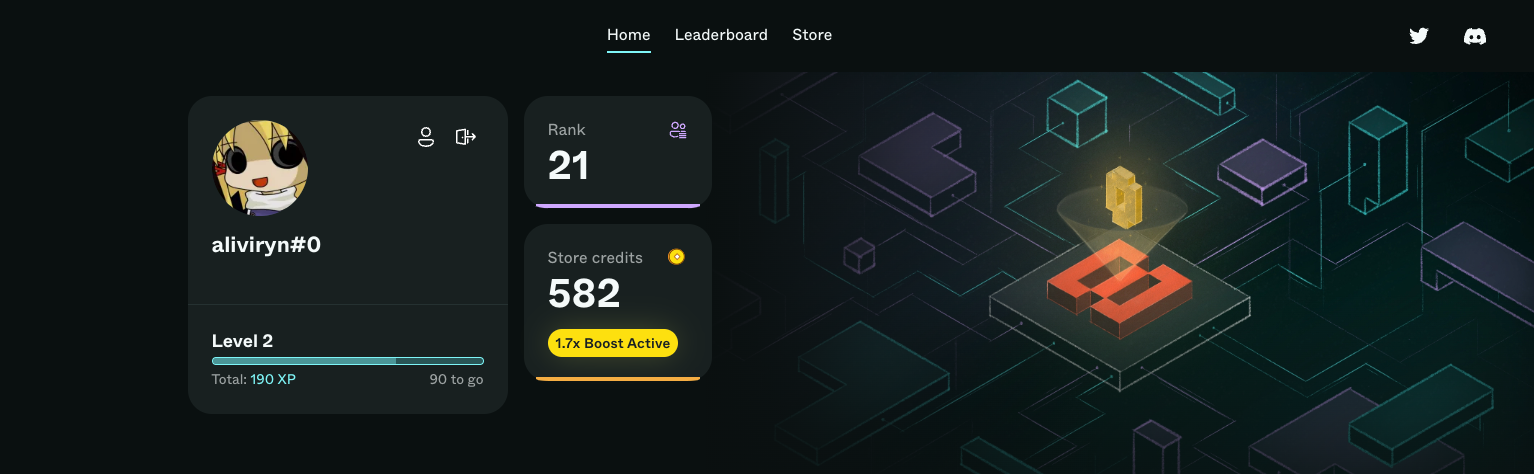
Community Hubs coordinate your customers' engagement activities using quests. Every Community Hub includes a branded storefront for automated prize fulfillment and an actionable Discord bot that completes quest actions from within your server. And our Sesame Labs Widget automatically detects and rewards website interactions, to turn first-time visitors into engaged community members.
To learn more, skip to the [Community Hub](/product-guides/community-hub) Product Guide.
To learn more about AI CoPilot, skip to the [AI CoPilot](/product-guides/ai-copilot) Product Guide.
To get started, continue below 👇
# Set up your Community Hub
Use this getting started guide to help you quickly get your Community Hub up and running.
# Create your first quest
Getting started with your first quest is simple and intuitive. Nevertheless, this setup guide will give you an in-depth tutorial of each step to create a mini-quest.
## 1. Basic Information
### **Quest title**
The headline or title of your quest helps visitors understand why they are on your quest page. Make sure your headline is clear, specific, and concise. It will be the difference between visitors starting the quest or leaving.
A compelling headline follows the format **\[CALL TO ACTION] + \[PRIZE]** and is **succinct**. You will be able to explain the quest in more detail in the description.
* Action verb examples: *win*, *earn*, *get*
* Prize description example: *$100 USD in Total NFT Prizes!*
### **Description**
Use this section to explain the details of the quest, why your community should participate in the quest.
#### **Inspire & motivate**
Use emotive language to inspire and motivate your community to rally around this quest.
#### **Prize**
Your description should also start with explaining (and compelling your audience to win) the prize — If it’s more than a straightforward cash prize, focus on its value, utility, rarity, special features, etc. If you have a page or article with more info, this is a good place to link to it.
> *Only {token} holders can participate in this quest to win $100 USD value in {$token} / to earn a spot on our allowlist for {upcoming NFT drop}. If you do not yet own a {NFT}, you can buy one on {NFT marketplace}. Winners will be chosen by raffle.*
Next, make clear what actions the quest participant must complete for a chance to win the prize. Even though it’s clear within the Milestones below, it’s important to mention that they must complete all steps to win.
> For a chance to win, you must complete ALL of the following milestones.
Privacy is an especially important topic across all communities. You may also wish to add a privacy disclaimer to let participants know how their privacy will remain protected after connecting.
> Please note: By connecting any of your wallet or social media accounts, you are granting read-only permissions for the purpose of validating you have completed these tasks. We do not share your information with any 3rd-parties and you can read our data privacy policy here.
### **Cover image**
The most dominant part of your quest page is the cover image. Keep it visual (no/limited text in image) and make sure there is a clear focal point rather than a busy image with many elements. The content should be relevant, colorful, and exciting/attention-grabbing.
Your cover image’s dimensions should be **2304x1296px** and either WebP, JPEG, or PNG format.
{% hint style="info" %}
**WebP** has excellent compression which helps your quest page load faster. You can convert images to WebP using a variety of online converters. [Here is one](https://image.online-convert.com/convert-to-webp).
{% endhint %}
### **Quest URL**
This is the unique URL for your quest, and will be the same whether you share the published or preview version. The *slug* is the last part of the URL address that serves as a unique identifier of the page. Although it is automatically created based on the title of your quest, you can edit it to make it shorter or easier on the eyes.
## 2. Timing
A quest must have a future launch date and time, as well as a definite end date and time. Once you publish your quest live, it will start showing a countdown timer in the top left until launch time!
## 3. Eligibility
You are free to make your quest open to everyone! However, if you want to make it more exclusive, you can gate your quest based on (1) net worth of the participant's total wallet holdings, (2) holding a specific NFT, (3) holding a specific token, (4) having a specific Discord role
This is simply to screen who gets to participate.
## 4. Steps
Each quest step is associated with a specific action, and event-based quests allow you to combine multiple steps across a variety of actions to lead participants on a journey through your content and dApp.
They must achieve **all** **steps** by the deadline you decide for a chance to win the quest prize.
Simply add a "Step" in your quest, then choose the desired "Action" you would like the quest participant to take.
To see the list of available actions, skip to [Actions](/product-guides/community-hub/quests/actions).
## 5. Rewards + Prizes
### Rewards
Here you can see the XP points that will be awarded upon completion. This reward cannot be edited, and is fixed based on the quest action.
You can, however, determine how many credits you would like to award upon completion of the quest.
### Prizes
Event-based quests offer the option to include additional prizes for participants who have completed the quest.
The prize is awarded via raffle, with eligibility limited to those participants who have successfully completed the quest.
Choose from an NFT, token, or a custom prize. Then select the number of rewards and raffle winners. And, lastly, upload a prize image. 👇
### **Quest prize image**
For Custom rewards, the image of the prize should be clear and self-explanatory. This could be an example of the item that participants can win or — if it’s for an allowlist spot — an image of what the allowlist gives access to.
Your prize image’s dimensions should be **at least 360 × 360px** with a **1:1 (square) aspect ratio** and either WebP, JPEG, or PNG format.
* Recommended: 360 × 360 at 1x density (equal to 120 × 120 px at 3x density)
* File size: <100 KB
* Aspect Ratio: 1:1 (square)
* Recommended Format: WebP, JPEG, or PNG
##
###
# Configure Community Hub Discord Bot
Learn more about our [Discord integration here](/product-guides/integrations/discord-bot).
### Installation Overview
Once you have a Sesame account and are in the your admin portal:
1. **Install the Bot**: Navigate to the CRM settings page on Sesame Labs and click on 'Discord Bot'. Here, you will find instructions to install the bot onto your server. Follow these steps to get the bot up and running.
* The bot will request Administrator permissions for installation. If you'd like to restrict permissions please do so after the installation to ensure that the bot initializes properly. See [#restricting-permissions-optional](#restricting-permissions-optional "mention")
2. **Configure the Bot**: Once the bot is installed, you'll find the configuration settings at the bottom of the same page. Set up the bot to suit the needs of your community.
3. **Review the Channels**: The bot automatically creates channels like guide, announcements, and activity in your Discord server.
* **Guide Channel**: This is the primary source of information for your community. It provides users with a walkthrough of all the bot's commands and functionalities.
* **Announcements Channel**: This is where all the general updates and news related to your community are posted. This could include the start of new quests, publication of quests, updates on ongoing activities, and more.
* **Activity Channel**: This channel tracks and showcases the general activity in your community. Activities such as purchases from the DApp store, approval of meme submissions, check-ins, and more are displayed here.
* **Meme Contest Channel**: All meme contest submissions are kept track of in this channel. It provides a platform for your community members to submit and view meme entries.
* **Commands Channel**: This channel is where users can input various commands to interact with the bot. Users can check-in, view the leaderboard, see the quests they're eligible for, and submit memes through commands in this channel.
4. **Monitor the Activity Channel**: Keep an eye on the activity channel for real-time updates on user activities, purchases, and submissions.
5. **Manage Meme Contest Submissions**: Check the meme contest channel for new meme submissions. You can `approve` or `disapprove` them right from this channel.
6. **Use the Commands Channel**: In this channel, you can use various commands to check status, view the leaderboard, and see the quests users are eligible for.
7. **Engage with your Community**: Use the bot to announce new quests, contests, and updates, and engage with your community members as they interact with the bot.
## Features & Benefits
1. **Interactivity**: Users can participate in activities, like daily check-ins and meme contests, directly within Discord. The bot not only tracks these activities but also links them back to the platform, maintaining coherence between Discord and your dApp.
2. **Organized Channels**: The bot automatically creates various channels in Discord, such as guide, announcements, activity, and meme contests. These channels streamline community engagement and keep users informed about ongoing quests and events.
3. **Ease of Use**: The bot can be easily installed and configured via Sesame's CRM settings page.
4. **Notifications and Updates**: The bot provides real-time updates on various activities such as quest announcements, purchase history, submission approvals, and meme submissions.
5. **Command Features**: The bot incorporates commands that users can use to check their status, view the leaderboard, see the quests they are eligible for, and more.
6. **Community Engagement**: By making it easier for users to participate in quests and check their status, the bot enhances user engagement and interaction within the community.
## Restricting Permissions (Optional)
After the bot is installed, feel free to restrict bot permissions. However, we recommend keeping Administrator permissions as new feature releases will require additional permissions and manual reconfiguration.
As of 6/20/2023, these are the minimum permissions required for current features:
* View Channels
* Manage Channels
* Manage Roles
* View Server Insights
* Change Nickname
* Send Messages
* Send Messages in Threads
* Embed Links
* Attach Files
* Add Reactions
* Mention @everyone, @here, and All Roles
* Read Message History
* Use Application Commands
> If you installed the bot prior to 6/20/2023 and decide to restrict permissions, you will need to change all of the quest channel permissions to allow the bot to send messages
# Set up your Rewards Store
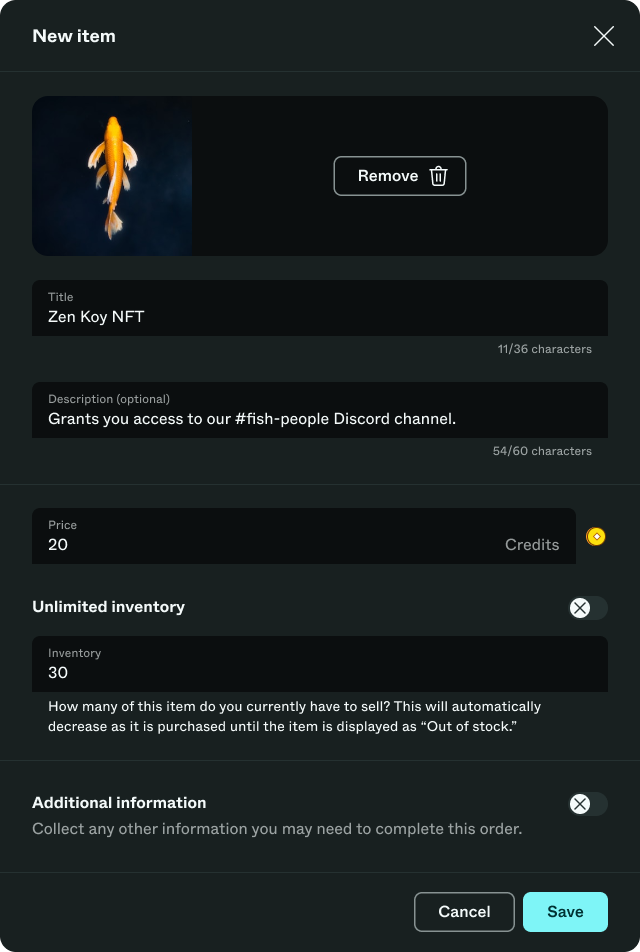
Simply upload an image, add a description, indicate how many items are in stock, and set the cost of the store item. That's all it takes to get your branded storefront up and running!
For more information on the Rewards Store, [click through to our product guide](/product-guides/community-hub/rewards-store).
# Deploy Sesame Widget
The Sesame Widget puts the full power of Community Hub into a collapsible widget that lives on any web property or app.
It automatically detects and rewards website and app interactions, allowing community managers to turn first-time visitors into engaged community members in real-time.
For configuration details, please check the [Sesame Labs Widget](/product-guides/community-hub/sesame-labs-widget) guide.
# Getting started videos
Because a video can sometimes be worth a thousand docs pages
We've put together a "Getting Started" playlist of videos to help you get the most out of Community Hub quickly and easily.
Find the playlist [here](https://www.youtube.com/watch?v=AlS4edIH_Zg\&list=PL-ILrkGokD4eQ0EdpuXAtVt3ufby3ZEoh\&pp=iAQB).
Or just watch the videos inline below 👇
{% embed url="" %}
{% embed url="" %}
{% embed url="" %}
{% embed url="" %}
{% embed url="" %}
# Best practices to get started
Now that you've successfully setup your Community Hub (and Discord Bot), you'll want to make sure your community (and the world) knows where to go and what to do.
You will be able to easily share your Hub link from the Getting started screen. This is the first step toward activating your community on Community Hub. But there's more to do.
We have compiled some best practices for getting started based on insights from over 1M+ community actions. Please do consider implementing as much of this list as possible:
* Share your Community Hub link on all social media. We provide some suggested copy for your social post, but feel free to customize it for your community.
* Not sure what to say? Here's a draft announcement to get you started:
> 🌟 Exciting news! 🌟
>
> We're thrilled to announce the launch of our brand-new {community name} Community Hub!
>
> Why join?
>
> 🚀 Complete quests to earn Credits
>
> 🏆 Compete for leaderboard dominance
>
> 💵 Spend Credits for cool prizes and swag
>
> 🔗 Ready to explore? Check it out here: \[Link]
* Include links to your Community Hub on your web properties. This can be your homepage, docs, forums, and even your app.
* Consider placing Community Hub into your navigation for the most visibility.
* Include a link to Community Hub on Reddit.\

* Include a link to Community Hub on your YouTube channel.
* Include a link to your Discord server on social media profiles
* Share new quests directly on social media. Alternatively, promote Community Hub via social posts once per week.
# FAQ
## Product
What do I do if the Twitter API goes down? Will my Twitter quests still work?
Sometimes even the most robust infrastructure goes down. If that happens with the Twitter API, rest assured that we have developed a fallback "escape hatch" to keep your Twitter quests running smoothly at all times.
In the case that the Twitter API goes down, we make it easy for the quest participant to submit a screenshot as proof of their completed action. The escape hatch gives Community Hub admins the ability to manually verify Twitter actions via review of photo submissions.
Soon, we'll bring this escape hatch to your Discord server via a dedicated manual verification channel.
How can you help web2 businesses take advantage of community growth and engagement in web3?
The challenge for web2 businesses looking to launch a web3 presence and community is two-fold.
* Reach existing customers where they ingest content or gather as a community?
* Build the foundation for a web3 community that is ready to welcome new and existing web2 members.
Sesame Labs provides the most value for brands and communities with an existing web3 footprint and a sizable community.
And, Sesame Labs is happy to work with web2 brands to build new touchpoints in web3. We offer community launch and marketing frameworks as well as co-marketing support to ensure your campaigns and growth plans hit their mark.
Who is the intended user of this no-code tool, and who in an organization would benefit most from its usage?
This no-code tool is designed primarily for senior marketing teams and community management professionals. However, anyone involved in community marketing and user engagement can effectively utilize this tool to enhance their workflow and achieve their goals.
How are you better than other quest-to-earn or crypto marketing startups?
Sesame's platform stands apart in the quest-to-earn and crypto marketing space due to its robust user engagement tools, adaptability, and growth potential. We offer a complete solution that not only stimulates on-chain activities but also enhances in-app engagement and user recruitment. Our platform is distinctively designed to focus on your specific project, unlike many other startups such as Zealy that centers around its own brand and project discovery.
We offer unique features such as:
1. **Comprehensive Integration:** Our system incorporates data from in-app, on-chain, social media, and even in-person interactions via QR codes or attendance, to create tailored quests.
2. **Advanced Spam Protection:** We prioritize user quality over quantity, employing features like IP fingerprinting, inspection of wallet interactions with malicious contracts, and wallet age.
3. **White-label Solutions:** Our platform can be customized to reflect your project's brand across your URL, Discord server, or our in-app widget.
4. **Discord Bot:** This allows users to achieve check-ins and other milestones without leaving your community's server.
5. **Wide Social Integrations:** We offer an extensive array of social integrations for wider reach.
6. **Dedicated Customer Support:** We provide bespoke support to ensure our clients maximize the benefits of our platform.
7. **Free to use:** Community Hub is free to use for all admins and mods of communities everywhere.
What blockchains do you support?
We currently support Polygon and EVM compatible chains with many more on our roadmap. Sign up to [our blog](https://mirror.xyz/0xc6025ED82cf2f3d87595195Ed6a1ae1a5a94Ecee) get updated when we launch our next protocol.
Our API can intake any event data from your application, so we can readily absorb data recorded from other blockchain networks. Even if we do not yet natively support certain chains, we can still capture and use their events within our application.
Where is your publicly-facing roadmap?
Our publicly facing product roadmap is [here on Canny](https://sesame-labs.canny.io/q2-2023-roadmap) and we are always open to new suggestions and ideas.
What does your API do?
[Our API ](https://docs.sesamelabs.xyz/feature-guides/sesame-api)simplifies the process for your team to provide us with any off-chain milestone data. This allows us to effectively track progress in real-time and confirm the completion of quests and milestones within your app.
Do you provide any customized development support?
We offer custom development support for our enterprise clients, be it integration with a new blockchain, social media integration, or administrative features. We take pride in our rapid pace of innovation and development, which is our competitive advantage.
For any specific questions, feel free to contact us at [**info@sesamelabs.network**](mailto:info@sesamelabs.network) or connect with us directly within our Discord community.
How do I change the spam ratings of users or disqualify them from a quest?
Through our Customer Relationship Management (CRM) system, you have two options for handling suspicious activity. You can either flag the participant's wallet as potential spam for future reference, or if necessary, you can opt to entirely remove the participant from the platform.
## Onboarding & Pricing
What is your pricing model?
Community Hub is free to use
What is your privacy policy?
Our privacy policy is [here](https://app.termly.io/document/privacy-policy/d9965219-c397-41c7-aa87-2f3c832c281f)
*If your question isn't answered here, please email or visit our* [*Discord*](https://discord.com/invite/vSgKbe75s8) *and ask us.*
# Use Cases
Here are some examples of relevant use cases for the Sesame Labs' platform.
These examples are centered around Community Hubs and their associated Quests. This section will get updated as we release more products and features.
# Boost community activity
Whether you're looking to amplify a social media campaign, keep your community buzzing on Discord, or looking to turn first-time web visitors into community members, our omnichannel integrations and flexible quest architecture help you meet your objectives.
* Amplify your social media campaigns with quest actions like:
* Retweet on Twitter
* Post on Instagram
* Visit TikTok
* Keep your Discord community buzzing with quest actions like:
* Daily check-ins
* Meme contests
* Photo proof to show off their selfies
* Turn your first-time website visitors into community members with:
* Sesame Widget
* Join Discord
* Follow on Twitter
[Sign-up for Community Hub today](https://sesamelabs.xyz/sign-up/?utm_source=docs\&utm_medium=gitbook\&utm_campaign=web2shift)
# Learning journeys
Education and onboarding journeys can be complex, but they don't have to be daunting. Use quests to lead your community through various journeys on their road to becoming a community champion.
* Send community members on a journey through your community with quest actions like:
* Visit website
* Visit docs
* Watch YouTube video
* Start an online course
* Then reward your community members for paying attention during their learning journey with quest actions like:
* Scavenger hunts
* Quizzes
* Photo proof that they completed a course
[Sign-up for Community Hub today](https://sesamelabs.xyz/sign-up/?utm_source=docs\&utm_medium=gitbook\&utm_campaign=web2shift)
# Vertical-specific use cases
## Gaming
* Boost in-game activity using in-app quests combined with our two-way API to sync in-game and Community Hub leaderboards
* Convert freemium users with our in-app quests & API
* Promote new in-game perks by amplifying your launch campaign on social media
## Education
* Use our in-app API to reward community members for completing online courses
* Reward community members for visiting websites, reading docs, watching videos
* Ensure retention of learning materials through quizzes and scavenger hunts
### Developers
* Drive developer community engagement with social amplification quests
* Increase uptake of documentation through rewards
* Reward community members for creating a support ticket instead of asking in General chat
[Sign-up for Community Hub today](https://sesamelabs.xyz/sign-up/?utm_source=docs\&utm_medium=gitbook\&utm_campaign=web2shift)
# Community Hub
Can't wait to try Community Hub yourself?
[Sign-up for Community Hub today](https://sesamelabs.xyz/sign-up/?utm_source=docs\&utm_medium=gitbook\&utm_campaign=web2shift)
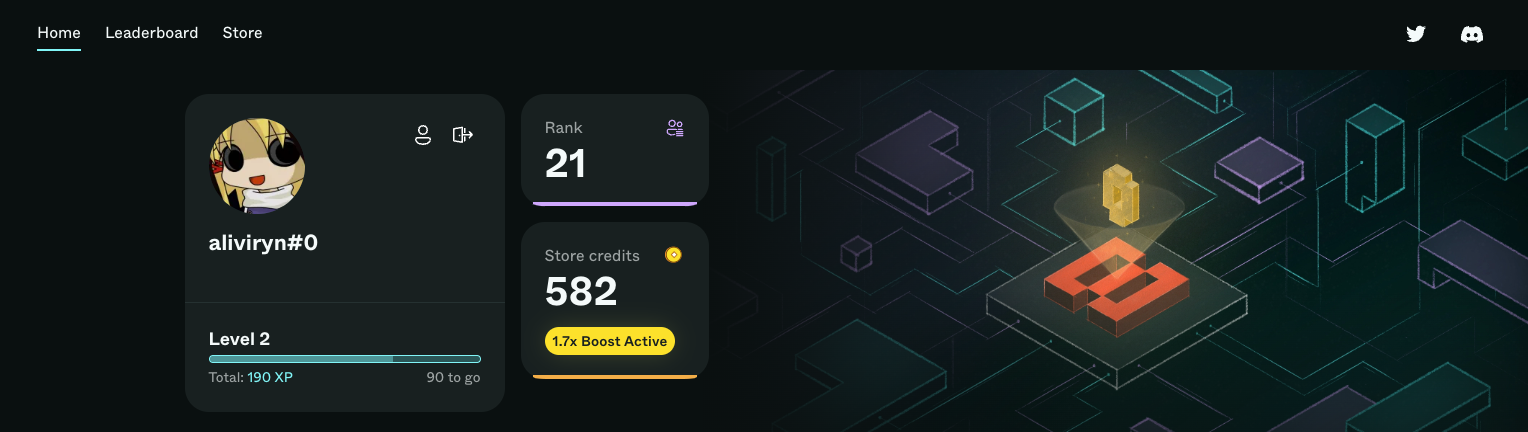
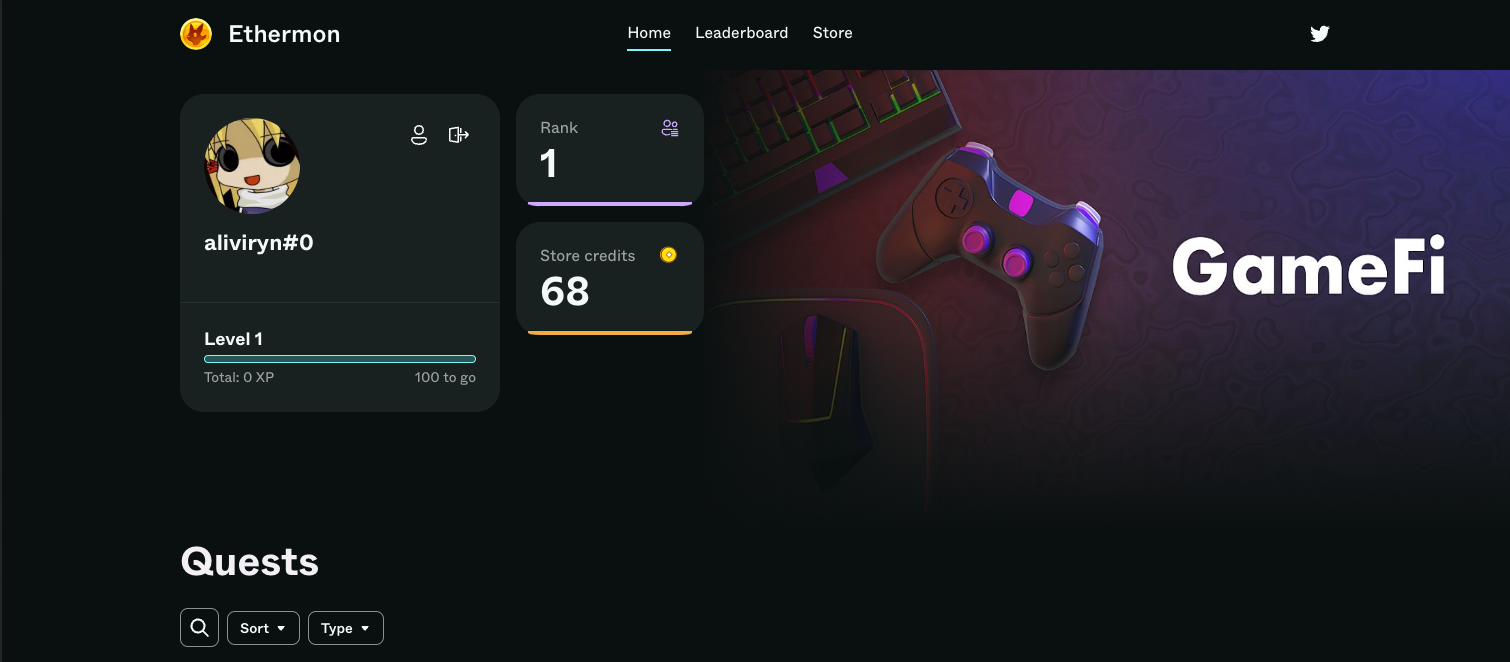
Our Community Hub is where everything comes together. It's a white-label solution that integrates seamlessly with your existing website, app, and social media.
Community Hubs coordinate community members' engagement activities using Quests, allowing them to:
* Find & complete new Quests
* Earn XP Points & Credits
* Purchase goods
* Check their leaderboard status
# Quests
Flexible, fully-configurable and whitelabeled
Sesame Labs' Community Hubs are designed to not only look-and-feel like your brand, the quests themselves are designed to be on-brand and flexibly configured.
In addition to the preset quest actions listed below, all quests support media, link and photo submissions. This allows community managers and marketers to get creative and configure quests to support any user journey on any channel.
Let's dive into all things Quest.
# Mini-quests
Typically, mini-quests will be your go-to quest type. As the name suggests, mini-quests are meant to focus on a single step. Mini-quests support the full list of actions below.
Every mini-quest will be displayed in the Community Hub as a distinct quest "card", with a single CTA (call-to-action) per card.
Rewards (XP + credits) are earned after the action has been completed.
# Event-based quest
These are multi-step quests that string together a combination of actions related to a specific event or a larger campaign. Think of event-based quests as a sequence of mini-quests.
Event-based quests are best used to amplify engagement around launches and time-bound campaigns.
In addition to supporting multiple, sequenced actions, event-based quests also offer much more flexibility compared to mini-quests:
#### Timing
Event-based quests are required to run for a specific period of time. Ideally this timing aligns with a campaign or launch activities, but the timing is fully configurable by the Admin of your Community Hub.
#### Eligibility
This feature restricts access to a event-based quest according to eligibility filters put in place by the Admin of your Community Hub.
The default option here is set to "Open to everyone".
For those looking to generate more targeted engagement, eligibility can be restricted based on:
* Net worth
* Screen for participants whose net worth falls within a certain range.
* NFT (non-fungible token) holdings
* Filter participants based on whether they hold an NFT from a specific collection.
* Token holdings
* Filter participants based on whether they hold a certain token in their wallet
* Discord role
* Filter participants based on whether they have a specific Discord role
#### Steps
Every step in an event-based quest must be completed in order to qualify for the associated rewards and prize(s).
Event-based quests require at least one defined step. There is no limit to the number of steps that can be combined in a giveaway quest.
Every step can be configured with a variety of Actions. (More on Actions below)
#### Prize
In addition to the quest rewards (XP + credits), Event-based quests can award an additional "Prize" via raffle to all participants. The raffle is conducted after the time-bound event has ended.
The prize can be:
* NFT
* Token
* Custom (off-chain & physical prizes)
Depending on the number of prizes offered, the Admin of your Community Hub can setup rules that determine the:
* Number of winners
* How many prizes each winner will receive.
# Referral quests
Leverage the network effects of your community with referral quests that reward users who bring you more users
We make it easy to reward your community for helping you acquire new users. Our referral quests make it easy to generate referral links and disburse rewards, all while guiding participants through specific actions.
Premia Finance's referral campaign
[Sign-up for Community Hub today](https://sesamelabs.xyz/sign-up/?utm_source=docs\&utm_medium=gitbook\&utm_campaign=web2shift)
# Groups
Custom quest management to put a spotlight on high priority quests & to support any user journey
Groups make it easy to organize & rearrange your Community Hub quests.
Quests are organized into "Groups", allowing them to be categorized by type or specific user journeys (eg. onboarding, learning, etc.)
When creating a new quest, you'll be given the option to add the quest to any of your existing groups. This is done via a dropdown menu.
### Group naming
Group names are editable. We've pre-populated your Community Hub with some standard groups. If you'd like to change the names of pre-populated groups (or any group that you create yourself), simply hover over the group name and click the "edit" icon.
Look for the "pencil" icon to edit group name
### Group creation and ordering
Creating a new group is easy. Re-ordering your groups is even easier!
To create a new group, simply scroll to the bottom of your Quests list, and look for the "New group" button. Click, name, and you're all set!
Click "New group" to create a custom group
### Quest ordering
Both quests and groups can be re-ordered by any Community Hub admin.
To change the order or your quests within a given group, drag and drop your target quest into its desired location. All changes made to quest ordering will be seen by your Community Hub participants in near real-time.
To change the order of your groups, simply drag and drop the group into its desired position.
Yes, it's really that easy.
[Sign-up for Community Hub today](https://sesamelabs.xyz/sign-up/?utm_source=docs\&utm_medium=gitbook\&utm_campaign=web2shift)
# Actions
### Actions
Actions are the specific task that a participant is required to complete to unlock the next Milestone (step). Every Milestone has a specific Action.
We're always adding new integrations to expand our list of supported Actions. Here is the current list of possible Actions today:
(Twitter Rush is highly configurable. See [Bot Commands for more details](https://docs.sesamelabs.xyz/product-guides/integrations/discord-bot#bot-commands))
#### Twitter
Follow, Tweet, Like, Comment, Retweet
#### Discord
Join, CheckIn
#### On-chain
Buy Token, Sell Token, Burn Token, Mint Token, Own Token, Buy NFT, Sell NFT, Burn NFT, Mint NFT, Own NFT, Smart Contract Interaction
#### Off-chain
In-dApp Event, Email, Join Telegram, Visit URL, Referral Promo Code, Post Media, Meme Contest, View Instagram Post, View Instagram Profile, Youtube Comment, Youtube Like, Subscribe to YouTube Channel, Watch Youtube Video, Photo Proof, URL Proof, Twitter Rush (like, retweet, comment)
* Social activities
* Visit URL
* Submit email
* Join a Discord server
* Follow a Twitter account
* Tweet with a specific hashtag (e.g., #MetaverseCup)
* Comment on a specific tweet
* Retweet a specific tweet
* View Instagram Post
* View Instagram Profile
* Youtube Comment
* Youtube Like
* Subscribe to YouTube Channel
* Watch Youtube Video
* Twitter Rush ([find configuration details here](https://docs.sesamelabs.xyz/product-guides/integrations/discord-bot#bot-commands))
* In-dApp activities (API), such as:
* Leaderboard achievements (e.g., within top 50 most wins in paid races, top 5 fastest time per race)
* Play (a number of) games
* Participate in a new feature (e.g., borrowing)
* Sign up on site
* On-chain activities
* Mint
* Buy
* Sell
* Burn
* Deposit
* Any other smart contract interaction on supported chains
* Other off-chain activities
* Join Telegram
* Referral Promo Code
* Post Media
* Meme Contest
* Photo Proof
* URL Proof
### Future actions
* Off-chain
* Promo code / text submission
* Discord
* Post on a specific channel
* Achieve a Discord role
* React to a specific announcement/message
# Quizzes
Our quizzes are more accurately described as an "action" but this feature is such a powerful engagement tool that we thought it deserved it's own section.
Our quiz action allows Community Hub managers to support users' learning journeys.
Simply:
* Upload a custom quiz or campaign-specific cover image
* Include a link to any content
* Set the max incorrect answers allowed (the number of lives they have)
* Build your quiz questions
Quizzes help gamify education and learning journeys. The best part is they incentivize participants to retain the information within the quiz. Retention isn't just a growth & marketing metric 😉
# Rewards
Quest participants are awarded Rewards every time they complete a quest (both mini- and event-based quests).
There are two types of rewards, each with it's own value proposition. Let's dive in.
### XP Points
* XP points determine participants' ranking on the Leaderboard
* They can be linked to Discord server roles, allowing Participants to sync their questing activity to their status within the community
* Higher levels of XP points can also be used to "Boost" the earnings rate of credits
* XP points cannot be exchanged for any goods or services.
### Credits
* Credits are used to purchase goods & services in the [Rewards store](/product-guides/community-hub/rewards-store)
* Participants can earn credits more quickly by ranking up on the leaderboard via XP Points
### Prizes
This is a special type of Reward that is only offered through Event-based Quests and Journey Quests. Learn more about Prizes in the [Quests](/product-guides/community-hub/quests)section.
# Rewards store
The Azra Games Store is a great example of a comprehensive branded store.
This is the final destination for Credits. Because we believe that rewards should reinforce your brand, we provide our white-label Rewards Storefront to all customers to ensure a consistent, branded experience.
Your Community Hub comes out of the box with a branded store. It's designed to be flexible to your needs, allowing you to list any physical or virtual goods, and even services (like subscriptions).
Simply upload an image, add a description, and set the cost of the store item. That's all it takes to get your branded storefront up and running!
### Cheat Sheet
Here are some examples of items you can list in the store:
#### Digital Goods
* NFTs
* Tokens
* Gift cards
* Subscriptions (publications, streaming platforms, digital tools)
#### Physical Goods
* Branded merch (e.g., t-shirts, hoodies, mugs, stickers)
* Branded gadgets (e.g., headphones, power banks, international plug adapters)
* Art prints and posters
* Comics
* Collectibles
#### Virtual Items
* Exclusive in-game perks and power-ups
* Special character skins and outfits
* In-game credits
* Virtual event tickets and access to exclusive events
#### Misc
* Meetup event - Meet-and-greet with the team
* Mystery boxes containing random items (digital or physical)
* Time-limited access to exclusive content or features
* Signed storyboards
### Coming soon
* We're working on fully automated on-chain rewards disbursement as well as a fulfillment solution.
# Leaderboard
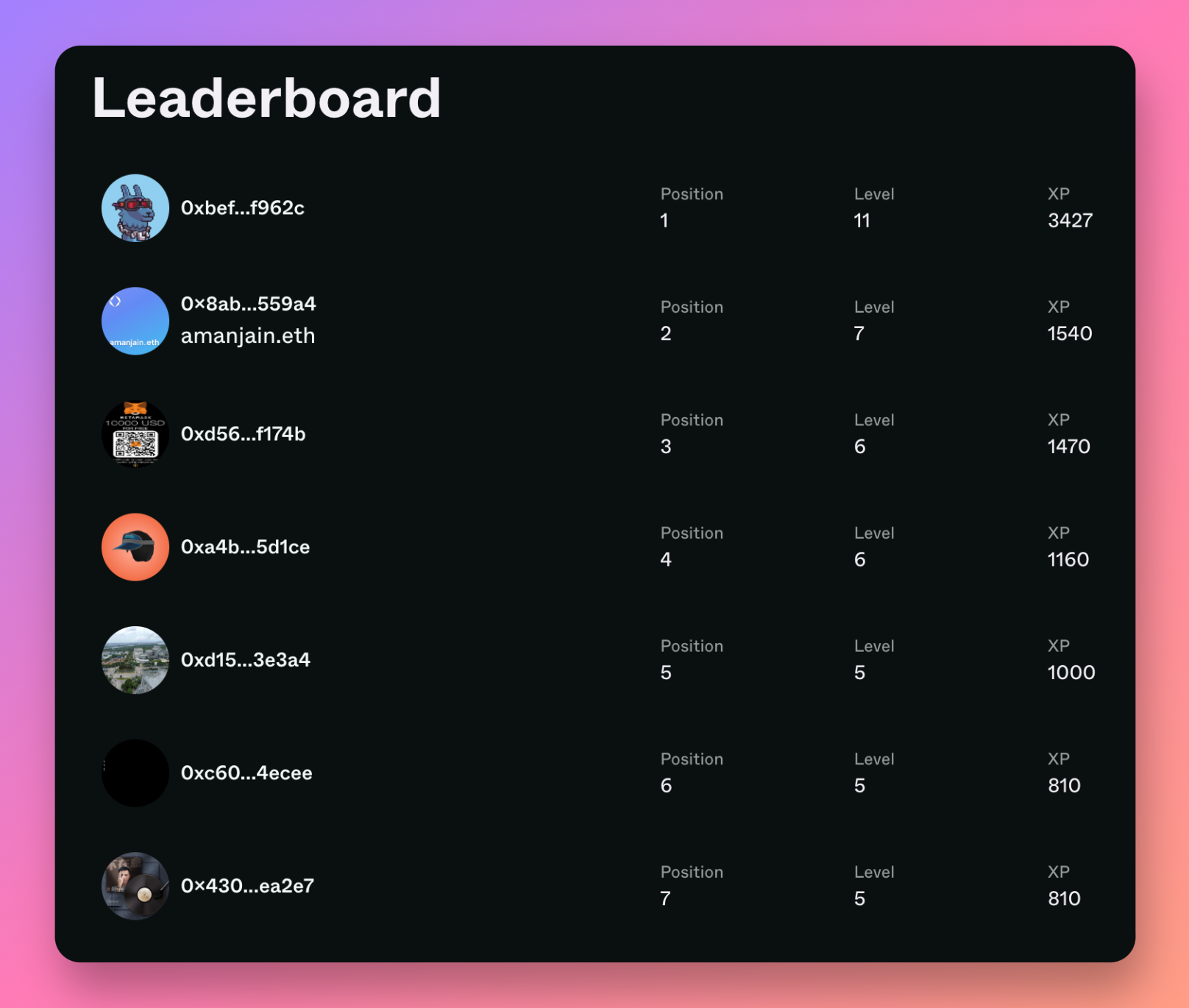
The leaderboard represents your community's activities and shows each community member's (participant) progress through all quests.
All quest participants are listed in order of their "Rank", relative to all other participants. The ranking is determined by the amount of "XP Points" earned by the participant as they complete quests in your Community Hub.
XP points are awarded for each successful quest completion. They are only awarded when a quest action has been fully verified. In this way, the XP points earned by your community members represents their level of engagement with your Community Hub.
### Reset your leaderboard
To help you keep the competitive spirit alive, Community Hub admins can reset the leaderboard. This will wipe out all XP Points accrued by every participant, and will reset their ranking on the leaderboard (remember: XP Points are what determine leaderboard rankings).
Keep in mind that Credits are never reset. Credits do not reset because they've been earned by participants and can be used to purchase store items, so it's not fair to reset their earnings.
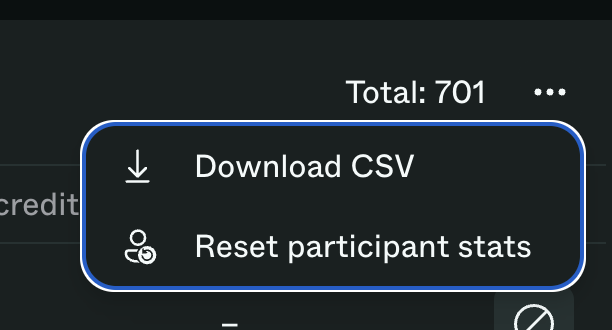
To reset your leaderboard, go to Participants on the left-hand navigation bar > then click the 3-dot menu in the upper right-hand corner > then click "Reset participant stats".
Look for Participants
Then click Reset participant stats
# Sesame Labs Widget
Your entire Community Hub, condensed down to an embedded widget, deployable on any web property.

[Sign-up for Community Hub today](https://sesamelabs.xyz/sign-up/?utm_source=docs\&utm_medium=gitbook\&utm_campaign=web2shift)
Your brand, your web properties, the deepest of integrations.
Sesame Labs Widget is an embedded widget that brings the full power of Community Hub to any web property. With a leaderboard and the rewards store neatly packaged together, your users never have to leave your platform.
### White-label capabilities
Customize Widget to your brand to ensure a seamless user experience. Some of our customization features are listed below. If you need a specific white-label option not listed below, let's chat. We're happy to build a solution that fits your needs.
* Colors
* Type
* Logos
* Open/close animations
### Incentivized website engagement
Direct integration with web properties opens the door to new user journeys. Imagine incentivizing specific user flows through your website. Then imagine incentivizing specific actions on your website with automated rewards disbursement to the user.
Widget makes that possible:
* Incentivize specific user flows
* Incentivize specific interactions (click, open/close, download, etc.)
* Automated rewards disbursement
* User journey-mapped quests
[Sign-up for Community Hub today](https://sesamelabs.xyz/sign-up/?utm_source=docs\&utm_medium=gitbook\&utm_campaign=web2shift)
# Install and configure Widget
Introducing the Sesame Labs Widget and Widget API! In this section we’ll cover off on how to deploy Widget and configure it via Widget API.
Let’s get right to it!
[Sign-up for Community Hub today](https://sesamelabs.xyz/sign-up/?utm_source=docs\&utm_medium=gitbook\&utm_campaign=web2shift)
### Widget deployment
Our no-code/low-code approach is embodied in Widget. Deployment onto any web property is as simple as adding a script to the \ tag of your `index.html` file:
```html
```
### Widget configuration
Once deployed, you can configure Widget via the API. You’ll find the configuration parameters via the `window.Sesame` object on the client side
#### Required widget keys
PUBLIC\_KEY - stored on client server (you)
PRIVATE\_KEY - stored on vendor server (Sesame Labs)
#### How to get the keys?
[Get in touch with us to obtain your keys](mailto:info@sesamelabs.network)
The client must path secure data in encrypted form. Every payload with sensitive data should be encrypted with `PUBLIC_KEY`
#### Methods available via window\.Sesame
Widget API uses **asymmetric cryptography to** pass secure data from client to vendor.
One aspect to note when calling a `window.Sesame` method. It may take some time to load, so add null safety to avoid errors.
Here’s an example of calling a `window.Sesame` method:
```jsx
const isWidgetReady = () => typeof window !== 'undefined' && 'Sesame' in window
if (isWidgetReady()) {
// call API methods
}
```
#### **1) Open/close**
Property name - `open/close`
Action - open/close widget
Returns - void
Usage
```jsx
window.Sesame.open()
window.Sesame.close()
```
#### 2\*\*) Hide/show\*\*
Property name - `hide`
Action - hide the widget from page
\
Returns - void
Usage
```jsx
window.Sesame.hide()
window.Sesame.show()
```
#### **3) Login**
**(🔑 0 - secure payload. This should be encrypted.)**
Property name - `login`
Action - authenticated user into widget based on data from client web app
Returns - void
Usage
```jsx
const authData = {
payload: 'VU7CJfh7jivtbeP7dlbPe5QkCRo3kRzuUJWiAu/vtmhF+kl9+s6d7p4XMx3wlLCPHMWMGEtQgs+oz1ePVehYgd6m+MXuKiGeBGjk7pPjlh/iQrjT7y/uhftuccZNG6H0LepW8kF2coQPu6QDtmA7qDOPkD02m2bI0LtShaCZ8M6xydM=',
publicKey: 'yGsboXRCQ/I1W9hLWP1cM1mRWxA5wyX0ShowXcj+V0k=',
nonce: 'PwZPaFup7uhgmq8HOoX+IZtDSpL66iau'
} - comes from client BE side
window.Sesame.login(authData)
```
**How to get `authData`**
Simply call `receiverPublicKey` (PUBLIC\_KEY is only available by [contacting Sesame Labs](mailto:info@sesamelabs.network))
```jsx
import nacl from 'tweetnacl'
import naclUtil from 'tweetnacl-util'
const msgParams = {
walletAddress: '0x1234', // wallet address of the user to log in
nonce: 'any string', //signed nonce
}
// function call should be next
const aData = encrypt('PUBLIC_KEY', JSON.stringify(msgParams))
export function encrypt(receiverPublicKey: string, msgParams: string) {
const ephemeralKeyPair = nacl.box.keyPair()
const pubKeyUInt8Array = naclUtil.decodeBase64(receiverPublicKey)
const msgParamsUInt8Array = naclUtil.decodeUTF8(msgParams)
const nonce = nacl.randomBytes(nacl.box.nonceLength)
const encryptedMessage = nacl.box(
msgParamsUInt8Array,
nonce,
pubKeyUInt8Array,
ephemeralKeyPair.secretKey,
)
return {
payload: naclUtil.encodeBase64(encryptedMessage),
publicKey: naclUtil.encodeBase64(ephemeralKeyPair.publicKey),
nonce: naclUtil.encodeBase64(nonce),
}
}
```
#### **4) trustLogin**
Property name - `trustLogin`
Action - login user with current selected Ethereum wallet address
Returns - boolean
Usage
```jsx
window.Sesame.trustLogin()
```
#### **5) isLoggedIn**
Property name - `isLoggedIn`
Action - check cookies validity. if not valid it will logout user from the widget automatically
Returns - boolean
```jsx
window.Sesame.isLoggedIn()
```
[Sign-up for Community Hub today](https://sesamelabs.xyz/sign-up/?utm_source=docs\&utm_medium=gitbook\&utm_campaign=web2shift)
# Discord bot
Our integration with Discord ensures quests are actionable from within Discord. But it doesn't stop there.
The Discord bot can be invoked from within Discord via slash commands, as well as via the Community Hub admin dashboard.
To learn how to get the most out of our Discord bot, head on over to [Discord bot](/product-guides/integrations/discord-bot)
# AI CoPilot
Meet AI CoPilot. Community Hub's custom genAI is the brains behind our automated quest creation capabilities.
AI CoPilot is designed to learn from your social media posts, Discord conversations, websites, and more. It takes these learnings and automagically creates fun, engaging, and on-brand quests for you in the background.
Auto-publish quests as they're created, or simply suggest quests for your review. You decide how autonomous you want AI CoPilot to be.
Combined with Community Hub's automated activity tracking, verification, and sending of rewards, AI CoPilot streamlines the community management workflows to save you time and hassle.
It's built into Community Hub, so there's no setup or training required. Simply connect your social, web, and Discord links and you're ready to go!
[Sign-up for Community Hub today](https://sesamelabs.xyz/sign-up/?utm_source=docs\&utm_medium=gitbook\&utm_campaign=web2shift)
# Admin & Moderation
Let's dive into the admin panel, the roles available to your team, and other Community Hub management features to make streamline your workflow.
# Roles
Community Hubs are managed by two types of users: admins and moderators.
### Admins
All Admins are granted superuser permissions and have the ability to modify the Community Hub itself, create/publish/pause/delete Quests, and moderate users and content. As you might expect, the Admin role can interact with every feature and editable component of a Community Hub.
At minimum, there must always be at least 1 Admin role assigned at all times.
The Admin role is necessary and sufficient. You can manage an entire Community Hub with just a single Admin.
### Moderators
The Moderator role is intended to assist the Admin with moderation duties. This role is restricted from making Community Hub-wide changes, creating or modifying Quests.
The Moderator is granted permissions to:
1\) Review submissions (meme contests, photo proof, etc.) for quality and eligibility. \
2\) View existing Quests and associated Quest details.
# Participants
The beating heart of every web3 brand is its community. Stay on top of your community activity through our participants dashboard.
Every participant across all your quests is aggregated into our participants dashboard. This view gives you an at-a-glance overview of every participant's:
* Net worth
* Fraud score
* On- & off-chain profiles
* XP points and credits earned
# Content moderation
Community Hub admins and moderators can review all content submissions from quest actions like "Meme Contest". Combined with our spam/fraud[^1] detection system, the content moderation view makes it easy to accept or reject a submission.
The spam/fraud score is determined based on a variety of on-chain and off-chain signals. This helps highlight which users are exhibiting genuine behavior and likely to be a higher-value community member.
We also use automated image detection to understand if an image is unique or copy/pasted.
And for actions like Meme Contests, we provide an overview of the content submitted by participants alongside their approved or rejected submission.
[^1]: Need to confirm if changing
# Fraud detection
Sesame Labs' takes quality seriously when it comes to community engagement and growth. The value of your community is directly tied to the quality of those users.
It's such a trivial task for web3 anons to create multiple wallets and social accounts, there's no mystery as to why airdrop and quest farming is so pervasive.
We consider this fraud and have developed (and continue to optimize) various detection systems to help you better understand your community and filter out spam.
### Sybil-hardened
We use on-chain heuristics to determine if a participant's wallet is likely to be unique or part of a group of wallets tied to the same participant. This helps prevent fraudulent behavior like airdrop farming.
### Social signals
When possible, we use social signals from Twitter, Discord, (and soon Instagram),
### Automated image detection
Our fraud detection even protects you against quest farmers. The most common example here is for a meme contest. We screen all submitted memes for ensure they are unique and eligible for the contest. This saves community managers and mods the time and hassle of manually reviewing every submission.
# Analytics
Coming soon 👀
# White-label Options
Community Hub comes out of the box with white-label configuration to provide a branded community experience.
# Custom domain
You can easily create a new page on your own domain i.e. yourdomain.com/quests and mirror Sesame Lab's hosted landing page on that page using an iframe.
Let’s say that your Community homepage is . If you'd like to serve it from your own domain, i.e. `yourdomain.xyz/quests` add an HTML page on your domain that looks something like this.
```html
Sesame Labs Quests
```
**Note:** Set the `title` of the page attribute, add your own favicon (`link href)`, and update the `iframe` src attribute to the Sesame Labs's community homepage url.
# iframe
Achieve the highest level of brand integration with a Community Hub that looks native to your website & dApp.
The iframe can be customized by passing in a configuration JSON object to the `name` attribute. Here are a list of possible configuration flags / keys
> We are actively working on customization. More customization keys will be available soon, but don't hesitate to reach out if you want something specific!
* `hideLogo` - boolean - default false - true if you want to hide the top left logo, false o.w.
Shows logo by default
Hides logo
* `overrideWidth` - number, px - default 1160 - overrides the content width of the page
* This does not affect smaller breakpoints
Overrides the width of the main content block
* `leftNavBar` - boolean - default false - true if you want the nav bar links to be left aligned, false o.w.
* This is usually used with `alignedNavBar: true`
* This is usually used with `hideLogo: true` as the logo has position absolute
leftNavBar toggled to true with hideLogo
default behavior of leftNavBar with hideLogo
* `alignedNavBar` - boolean - default false - true if you want the nav bar to be aligned with the quest cards, false o.w.
alignedNavBar set to true
alignedNavBar defaults to false
Example:
`
```
2. Once the user logs into your website you need to pass the user's authToken to the iframe by appending it to the src attribute. This can be done with some code like this
```javascript
const frame = document.getElementById('sesame-app');
const authToken = "";
if (frame) {
const separator = frame.src.includes('?') ? '&' : '?';
frame.src = frame.src + `${separator}authToken=${authToken}`;
} else {
console.error('Element with id "sesame-app" not found');
}
```
**3/ Leverage our Community hub APIs to send us user events and reward users with credits/xp**
Once the integration is complete, you can leverage our [Community Hub APIs](/product-guides/integrations/api/community-hub-api) to send events and reward users with credits/xp using the user ID of the user in your DB (*externalId)*
# Integrations
# Printful
Our Printful integration allows you to do two things:
1. Import items from your Printful store to your Sesame Labs store.
2. Send orders from your Sesame Labs store to Printful for fulfillment with one click.
This guide will cover the process of setting up this integration for the first time, and working with Printful after it's set up.
# Setup
## Step 1: Creating a Printful Private token
* Go to the [Printful Developers](https://developers.printful.com/login) site and sign in with your account.
* Create a private token.
* Configure your token details as you see fit. The name and contact email, and expiration date are up to you.
* Access level
* Choose **A single store**.
* Select the store you'd like to sync with your Sesame Labs store.
* Scopes
* Select all scopes except for the ones pertaining to webhooks
Select the scopes shown here.
* Click **Create new token**
* Copy your access key
After your private token is created, copy it here. You will only be able to view this token once on Printful's developer portal.
## Step 2: Add your Private token to your Sesame Labs account
* Log into your Sesame Labs admin page and click on **Settings** in the left-hand nav bar.
* Click on **Integrations** in the quick links panel, or scroll down until you see the **Integrations** section.
* Click **Connect** next to the Printful integration.
* Paste your private token into the input field and click **Connect**.
[Sign-up for Community Hub today](https://sesamelabs.xyz/sign-up/?utm_source=docs\&utm_medium=gitbook\&utm_campaign=web2shift)
## Troubleshooting
If you previously created an API key via Printful's Settings -> API page, you **cannot** use this key to integrate with Sesame Labs. You must go to the [Printful Developers](https://developers.printful.com/login) site and create a Private token. Refer to the steps above for instructions.
# Working with Printful items
[Sign-up for Community Hub today](https://sesamelabs.xyz/sign-up/?utm_source=docs\&utm_medium=gitbook\&utm_campaign=web2shift)
## Importing items from your Printful store
* Click **Store** on the left-hand nav bar.
* Click the ••• menu next to the New item button.
* Click **Import from Printful.**
* Click **Import items** on the confirmation modal.
{% hint style="info" %}
This will import *all* of the items from your connected Printful store. You can delete any items you do not want to see in your Sesame Labs store.
{% endhint %}
Imported items will be in a draft state after they are imported. This means they will not appear in your community hub until you publish them.
You will need to add a price and inventory quantity for all imported items before they can be published. To do this:
* Hover on top of a store item card and click the ••• menu in the upper-right corner.
* Click **Edit**.
* Enter a value in the **Price** field.
* Enter a value in the **Inventory** field, or activate the **Unlimited inventory** option.
* Click **Save**.
Once you've made the necessary edits to your items, you can publish them to your community hub store for purchase. To do so:
* Hover on top of a store item card and click the ••• menu in the upper-right corner.
* Click **Publish**.
{% hint style="info" %}
Shipping address will be collected from buyers automatically when they purchase an item that is synced from Printful. This is the only information collected for Printful orders.
{% endhint %}
## Sending orders to Printful
When someone buys an item you've imported from Printful, the order will appear in your Orders tab on your admin Store page just like other store orders.
To send these orders to Printful for fulfillment, you can do one of the following:
* Send an individual order: click **Send to Printful** button at the end of the order row.
* Send all Printful orders at once: click the ••• options menu in the upper-right corner of your Orders page, and click Send all Printful orders.
Sending orders to Printful from your Sesame store creates Draft orders in your Printful shop.
{% hint style="info" %}
Draft orders in Printful are not complete. You will need to visit your Printful orders page to confirm all Draft orders.
{% endhint %}
You can view the order details page for an order you've sent to printful by clicking the Open icon button at the end of the order row in your Sesame Orders page.

After you confirm orders in Printful, the order status will be automatically updated. When an item is fulfilled, it will be automatically marked as such in your Sesame store.
## Toubleshooting
Sometimes orders can run into issues after they're sent to Printful for fulfillment. This can happen for a number of reasons. If it does, you will see the status on your Sesame Orders page change to Action required.

If you see this status, click on the **open** icon button next to it to view the order details on Printful and resolve the issue there. Once the issue is resolved, the order status on your Sesame Orders page will update automatically.
# Discord bot
All your Quests are actionable within Discord.
Our bot automagically injects a Quest update into the designated channel, allowing anyone to easily complete the task without leaving your server.
[Sign-up for Community Hub today](https://sesamelabs.xyz/sign-up/?utm_source=docs\&utm_medium=gitbook\&utm_campaign=web2shift)
## Video walkthrough
{% embed url="" %}
### Overview
Once deployed, our Discord bot automatically creates a "Quest" channel category that helps organize all bot activity.
In the Quest category, the bot creates a handful of useful channels:
* Announcements - Home to any questing-related announcements, such as new quests, quest steps, leaderboard ranking updates, and quest winners
* Commands - Dedicated channel to use any quest-related bot commands
* Activity - A feed of quest-related activity such as quest completions 
* Meme-contest - A place to see and react to memes for the weekly meme contest
### Bot settings
From your Community Hub admin dashboard, you can configure the Discord bot to:
* Automatically notify a specific Discord role when a new quest is published
* Send a notification when a quest is started
* Send a notification when quest winners are selected
Simply click on "Settings" in the left-hand sidebar, then "Discord Bot"
### Bot commands
These are some useful bot commands that can be called from within Discord using the "/" + \[command] format:
* `/checkin` - Daily check in
* `/quest` - View the latest quests
* `/leaderboard` - View the leaderboard
* `/status` - View your current status information, such as level, xp, and credits
* `/submit-meme` - Submit a meme for the weekly meme contest!
> Admin only commands check for Discord user permissions to manage channels
* `/award-credits` - (Admin only) Manually award credits to users

* `/rush` - (Admin only) Create a Twitter Rush quest with configurable reward amounts and the option to remove specific actions
> If you installed the bot prior to 6/20/2023 and decide to restrict permissions, you will need to change all of the quest channel permissions to allow the bot to send messages
# API
Sesame Labs offers APIs for both our Community Hub and Widget
Our Community Hub API allows you to track in-app or off-chain activity for automated verification via Community Hub.
The Widget API makes deployment and configuration of the Sesame Labs Widget a breeze.
Continue below to learn more.
# Community Hub API
Our powerful Community Hub API makes it easy to detect, track and auto-verify any in-app or off-chain action.
### Authentication
You need to pass your API token as a header `x-api-key` for all requests.
### Where to find your API key
You can find your API key by signing in to sesamelabs.xyz and then visiting `Settings -> In-App Events` API section.
### Events API
Our product already has integrations with social platforms (like Twitter, Discord, Telegram, Youtube, etc). We also have on-chain integrations (Ethereum, Polygon). However, sometimes you might want to create Quests that incentivize off-chain activity that happens within your product (website, mobile, etc). This is where our events API can be used. Use the below POST endpoint to send events. Once that is hooked up, you can create a Quest, select Action type `In-App` and select the event name from the dropdown.
## Create an Event
`POST` `https:/sesamelabs.xyz/api/v0/events`
Use this API to send an event that takes place on your website to our servers. This can then be used to create Quests to incentivize user activity within your product.
#### Request Body
| Name | Type | Description |
| ----------------------------------------------- | ------ | ------------------------------------------------------------------------------------------------------------------------------------------------------------------------------------------------ |
| walletAddress\* | String | walletAddress of the user that completed the in-game event |
| value\* | Number | number of events completed by the wallet. In most cases it is best to use 1. However if you need to batch multiple completions of the same event, then this value can be something other than 1. |
| event | String |
The name of the event. It would be great to keep the format of the events consistent. E.g. camel casing, active/passive voice etc. e.g., "battleWon"
{% endtab %}
{% tab title="500: Internal Server Error Error response" %}
```json
{"success": false}
```
{% endtab %}
{% endtabs %}
### Users API
#### User Type
Our `User` type has the following schema. It would either return the wallet address if the user authenticated with the wallet address or will return the discord id and the user name if requested with the discord id.
```
User {
id: string,
appId: string,
xp: number,
credits: number,
points: number
level: number,
walletAddress: string?,
discordId: string?,
discordUser: string?,
twitterId: string?,
twitterUsername: string?,
externalId: string?
}
```
#### Get User by Wallet Address
## User by wallet address
`GET` `https://sesamelabs.xyz/api/v0/users/by/wallet/`
Fetch a user based on their wallet address.
#### Path Parameters
| Name | Type | Description |
| ----------------------------------------- | ------ | -------------- |
| address\* | String | wallet address |
{% tabs %}
{% tab title="200: OK The user object" %}
```json
{
"appId": "clif75qg30016usyr0gb0c4mt",
"credits": 0,
"id": "clif7o49z0005usolwkuf7nv0",
"level": 1,
"walletAddress": "0xblahblah",
"xp": 0
}
```
{% endtab %}
{% endtabs %}
#### Get User by ID
## User by ID
`GET` `https://sesamelabs.xyz/api/v0/users/`
Fetch user based on id
#### Path Parameters
| Name | Type | Description |
| ---------------------------------- | ------ | ----------- |
| \* | String | User ID |
{% tabs %}
{% tab title="200: OK The user Object" %}
```json
{
"appId": "clif75qg30016usyr0gb0c4mt",
"credits": 0,
"id": "clif7o49z0005usolwkuf7nv0",
"level": 1,
"walletAddress": "0xblahblah",
"xp": 0
}
```
{% endtab %}
{% endtabs %}
#### Get User by Discord ID
## User by DiscordID
`GET` `https://sesamelabs.xyz/api/v0/by/discord/`
Fetch user based on discord ID.
#### Path Parameters
| Name | Type | Description |
| ------------------------------------------- | ------ | ---------------------- |
| discordId\* | String | Discord ID of the user |
{% tabs %}
{% tab title="200: OK The User object with Discord details" %}
```json
{
"id": "clif7o49z0005usolwkuf7nv0",
"appId": "clif75qg30016usyr0gb0c4mt",
"xp": 0,
"level": 1,
"credits": 0,
"discordId": "3050389892855xxxx",
"discordUsername": "user#2828"
}
```
{% endtab %}
{% endtabs %}
#### Get User by External ID
## User by External ID
`GET` `https://sesamelabs.xyz/api/v0/users/by/external-identity/`
Fetch user based on external id
#### Path Parameters
| Name | Type | Description |
| ---------------------------------------------- | ------ | ----------- |
| external\_id\* | String | User ID |
{% tabs %}
{% tab title="200: OK The user Object" %}
```json
{
"appId": "clif75qg30016usyr0gb0c4mt",
"credits": 0,
"id": "clif7o49z0005usolwkuf7nv0",
"level": 1,
"walletAddress": "0xblahblah",
"xp": 0
}
```
{% endtab %}
{% endtabs %}
#### Get Users
## Leaderboard
`GET` `https://sesamelabs.xyz/api/v0/users/`
Gets a list of users sorted by XP
{% tabs %}
{% tab title="200: OK A list of users." %}
```json
[
{
"appId": "clif75qg30016usyr0gb0c4mt",
"credits": 0,
"id": "clif7o49z0005usolwkuf7nv0",
"level": 1,
"startedAt": "2023-06-02T23:43:23.303Z",
"walletAddress": "0x3d7ec64a87ed1c446a414bef7d939f39ea16271e",
"xp": 0
},
....
]
```
{% endtab %}
{% endtabs %}
#### Create a User with a wallet address
## Create user with a wallet address
`POST` `https://sesamelabs.xyz/api/v0/users/`
Create a user with a given wallet address.
#### Request Body
| Name | Type | Description |
| ----------------------------------------------- | ------ | ----------------------------------------- |
| walletAddress\* | String | Wallet address as string e.g., 0xblahblah |
{% tabs %}
{% tab title="200: OK Newly created user object." %}
```
{
"id": "clif8vqjf000ausolyzzocrfc",
"appId": "clif75qg30016usyr0gb0c4mt",
"xp": 0,
"level": 1,
"credits": 0,
"walletAddress": "0x22ba14068266f2e3daC1d441782001590E0d8EA0"
}
```
{% endtab %}
{% endtabs %}
#### Create a User with an external ID
## Create user with a external id
`POST` `https://sesamelabs.xyz/api/v0/users/by/external-identity`
Create a user with an external identity, email, and name
#### Request Body
| Name | Type | Description |
| -------------------------------------------- | ------ | ----------------------------- |
| externalId\* | String | ID of the user in your DB |
| fullName\* | String | full name of the user |
| email\* | String | email of the user |
| avatar | String | URL of user's profile picture |
{% tabs %}
{% tab title="200: OK Newly created user object." %}
```
{
"id": "clif8vqjf000ausolyzzocrfc",
"appId": "clif75qg30016usyr0gb0c4mt",
"xp": 0,
"level": 1,
"credits": 0,
"walletAddress": "0x22ba14068266f2e3daC1d441782001590E0d8EA0"
}
```
{% endtab %}
{% endtabs %}
#### Reward user with XP and Credits
## Reward User
`POST` `https://sesamelabs.xyz/api/v0/users//reward`
Reward users with XP and Credits.
#### Path Parameters
| Name | Type | Description |
| ---------------------------------- | ------ | ----------------------------------------- |
| \* | String | The User ID that want to grant rewards to |
#### Request Body
| Name | Type | Description |
| ------------------------------------------- | ------ | ------------------------------------ |
| xp\* | Int | XP |
| credits\* | Int | Credits |
| eventName\* | String | eventName assocated with the reward. |
{% tabs %}
{% tab title="200: OK Status" %}
```json
{"success": true}
```
{% endtab %}
{% endtabs %}
**Reward by external user id with XP and Credits**
## Reward User by external ID
`POST` `https://sesamelabs.xyz/api/v0/users/by/external-identity//reward`
Reward external user id with XP and Credits.
#### Path Parameters
| Name | Type | Description |
| ---------------------------------------------- | ------ | ----------------------------------------------------------- |
| external\_id\* | String | The ID of the user in your DB that want to grant rewards to |
#### Request Body
| Name | Type | Description |
| ------------------------------------------- | ------ | ------------------------------------------------------------------------- |
| xp\* | Int | XP |
| credits | Int | Credits |
| eventName\* | String | eventName assocated with the reward. |
| points | Int | Same as Credits. Exactly one out of `credits` or `points` must be present |
{% tabs %}
{% tab title="200: OK Status" %}
```json
{"success": true}
```
{% endtab %}
{% endtabs %}
# Widget API
Introducing the Sesame Labs Widget and Widget API! In this section we’ll cover off on how to deploy Widget and configure it via Widget API.
Let’s get right to it!
[Sign-up for Community Hub today](https://sesamelabs.xyz/sign-up/?utm_source=docs\&utm_medium=gitbook\&utm_campaign=web2shift)
### Widget deployment
Our no-code & low-code approaches to development is embodied in Widget. Deployment onto any web property is as simple as adding a script to the \ tag of your `index.html` file:
```html
```
### Widget configuration
Once deployed, you can configure Widget via the API. You’ll find the configuration parameters via the `window.Sesame` object on the client side
#### Required widget keys
PUBLIC\_KEY - stored on client server (you)
PRIVATE\_KEY - stored on vendor server (Sesame Labs)
#### How to get the keys?
[Get in touch with us to obtain your keys](mailto:info@sesamelabs.network)
The client must path secure data in encrypted form. Every payload with sensitive data should be encrypted with `PUBLIC_KEY`
#### Methods available via window\.Sesame
Widget API uses **asymmetric cryptography to** pass secure data from client to vendor.
One aspect to note when calling a `window.Sesame` method. It may take some time to load, so add null safety to avoid errors.
Here’s an example of calling a `window.Sesame` method:
```jsx
const isWidgetReady = () => typeof window !== 'undefined' && 'Sesame' in window
if (isWidgetReady()) {
// call API methods
}
```
#### **1) Open/close**
Property name - `open/close`
Action - open/close widget
Returns - void
Usage
```jsx
window.Sesame.open()
window.Sesame.close()
```
#### 2\*\*) Hide/show\*\*
Property name - `hide`
Action - hide the widget from page
\
Returns - void
Usage
```jsx
window.Sesame.hide()
window.Sesame.show()
```
#### **3) Login**
**(🔑 0 - secure payload. This should be encrypted.)**
Property name - `login`
Action - authenticated user into widget based on data from client web app
Returns - void
Usage
```jsx
const authData = {
payload: 'VU7CJfh7jivtbeP7dlbPe5QkCRo3kRzuUJWiAu/vtmhF+kl9+s6d7p4XMx3wlLCPHMWMGEtQgs+oz1ePVehYgd6m+MXuKiGeBGjk7pPjlh/iQrjT7y/uhftuccZNG6H0LepW8kF2coQPu6QDtmA7qDOPkD02m2bI0LtShaCZ8M6xydM=',
publicKey: 'yGsboXRCQ/I1W9hLWP1cM1mRWxA5wyX0ShowXcj+V0k=',
nonce: 'PwZPaFup7uhgmq8HOoX+IZtDSpL66iau'
} - comes from client BE side
window.Sesame.login(authData)
```
**How to get `authData`**
Simply call `receiverPublicKey` (PUBLIC\_KEY is only available by [contacting Sesame Labs](mailto:info@sesamelabs.network))
```jsx
import nacl from 'tweetnacl'
import naclUtil from 'tweetnacl-util'
const msgParams = {
walletAddress: '0x1234', // wallet address of the user to log in
nonce: 'any string', //signed nonce
}
// function call should be next
const aData = encrypt('PUBLIC_KEY', JSON.stringify(msgParams))
export function encrypt(receiverPublicKey: string, msgParams: string) {
const ephemeralKeyPair = nacl.box.keyPair()
const pubKeyUInt8Array = naclUtil.decodeBase64(receiverPublicKey)
const msgParamsUInt8Array = naclUtil.decodeUTF8(msgParams)
const nonce = nacl.randomBytes(nacl.box.nonceLength)
const encryptedMessage = nacl.box(
msgParamsUInt8Array,
nonce,
pubKeyUInt8Array,
ephemeralKeyPair.secretKey,
)
return {
payload: naclUtil.encodeBase64(encryptedMessage),
publicKey: naclUtil.encodeBase64(ephemeralKeyPair.publicKey),
nonce: naclUtil.encodeBase64(nonce),
}
}
```
#### **4) trustLogin**
Property name - `trustLogin`
Action - login user with current selected Ethereum wallet address
Returns - boolean
Usage
```jsx
window.Sesame.trustLogin()
```
#### **5) isLoggedIn**
Property name - `isLoggedIn`
Action - check cookies validity. if not valid it will logout user from the widget automatically
Returns - boolean
```jsx
window.Sesame.isLoggedIn()
```
[Request access to Sesame Labs Widget](https://request.sesamelabs.xyz/request_demo)
# Sesame Labs brand assets
Brand guidelines [can be viewed here](https://www.figma.com/proto/dBIrfGaO1963tzmPyslfSF/Sesame---Brand-guidelines?page-id=0%3A1\&type=design\&node-id=1-62\&viewport=2238%2C1494%2C0.19\&t=mncoX9AIn1WToaSi-1\&scaling=min-zoom\&mode=design).
Download print, web and vector assets for the Sesame Labs logo below.
{% file src="/files/iJcNNID3EN6rPjKPcJyT" %}
# Contact us
[Email us at support@sesamelabs.network](mailto:support@sesamelabs.network)